
Support
Automation technology training for the field
Training
Experienced field engineers deliver practical training that combines theory and hands-on practice.
Learn field-focused skills using equipment used on real industrial sites and our own training kits.
Course Overview
TIA Selection Tool — the smart choice for selecting SIMATIC products
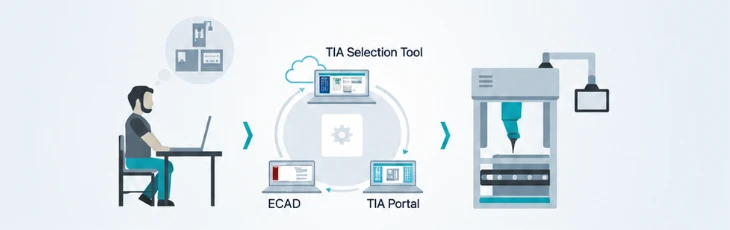
Selecting SIMATIC products such as PLCs and HMIs takes a lot of trial and error and effort — especially detailed choices like accessories and software options. TIA Selection Tool is a free software tool that helps you select almost any SIMATIC product and accessory quickly and easily, generating BOMs as well as hardware profiles that can be imported into TIA Portal and EPLAN.
Controllers, software, HMIs, power supplies and more can be selected easily by drag and drop according to your requirements, and selection mistakes are blocked at the source as errors. Selected products convert directly into an order list for ordering and materials management. It is available as a download version and a cloud version, and selection projects can be saved on a local PC or in the cloud.
Courses
| Contents | Courses |
|---|---|
| 1 | Introduction to TIA Selection Tool |
| 2 | Creating projects and configuring Portal View and Project View |
| 3 | Adding Siemens devices and introduction to other devices |
| 4 | PLC configuration and settings |
| 5 | I/O card compare and warning/error diagnostics |
| 6 | Checking 24V DC load view, hardware limits and current |
| 7 | Adding HMI, SCALANCE, S120, S210, etc. and network configuration |
| 8 | BOM and ECAD (Project → Export → EPLAN, S7, TIA) |
| 9 | Opening ECAD files in TIA Portal |
Course Overview
SIMATIC TIA Portal S7-1200
Learn how to use TIA Portal, the basic structure of the SIMATIC S7-1200 automation system, hardware configuration and parameter settings, and programming fundamentals. You will also learn to control axis motion precisely using integrated motion control, and after the course be able to select appropriate technology objects — speed, positioning and synchronous axes — and integrate them into your program.
Courses 3-day course
- Day 1
TIA Portal STEP7 Basic
- H/W System Overview
- Engineering Software
- Hardware Configuration
- Devices & Networks
- PLC-Tags
- Program Blocks
- Day 2
TIA Portal STEP7 Basic
- Binary Operations
- Digital Operations
- Data Blocks & Block Move
- FC · FB
- Multi Instance DB
- OB Blocks
- Day 3
TIA Portal WinCC Basic · Startdrive
- S210 Axis / Network Setting
- S210 Programming
- HMI Hardware Setting / Download
- HMI screen design practice with S210
- Alarm View / Tag Logging
- Practice and Q&A
Course Overview
Electrical Product Training
- Understand the basic concepts and characteristics of electrical products used in electrical system design.
- Learn safe design methods that protect equipment from a range of hazards.
- Understand types and characteristics of electrical protection and select products by protection method.
- Understand the regulations and requirements each product must reflect.
- Understand national certification requirements such as IEC/CE and UL and the corresponding design methods.
Course Content
- 01
Low Voltage Training
- Basics of circuit breakers and characteristics of each product
- Types of electrical protection and selecting breakers by application
- 02
Motor Protection Training
- Basics of product types for motor protection
- Characteristics and selection of motor protection products
- Training on protection of motor drives
- 03
Certification Training
- Electrical panel training for IEC/CE certification
- Electrical panel training for UL certification
- Product consulting for overseas regulations in international projects
- 04
Electrical Design Training
- Concepts and application of panel configuration
- Application for compact panels
- Overview and application of busbar system panels
- 05
Other
- Overview of other electrical products and how to select them
Course Overview
Customized Training
ER SYSTEM Co., Ltd. provides customized training tailored to the curriculum that companies and individuals need.
Tell us your trainees, goals, and the equipment or controllers you use, and we will plan the content and schedule with you.
Training Inquiries
Contact us with any questions about courses and schedules.
- Contact
- In-cheol Hong, Head of Technical Support Team
- techsupport@ersystem.co.kr
How can I check the training schedule?
Tell us your preferred course and number of trainees through a training inquiry, and we will arrange the schedule with you.
Can the training content be customized?
Yes. Customized training lets us build the content around your equipment and training goals.
What should I prepare?
Letting us know the number of trainees, the course you want, and the equipment or controllers you use helps us consult with you faster.